Analysis model: gpt-5.5 xhigh
Megablast by Orange - Technical Dissection
Megablast is Orange's PC demo from The Party 1996. Pouet lists it as a
December 1996 MS-DOS demo, ranked second in the PC demo competition, with code
by Hoplite, graphics by Der Piipo, and music credited on the page without a
visible handle. The release package identifies it as:
Megablast / Orange
    TP 6 demo
Release year: 1996
The short version: this is the larger-demo sibling to Orange's 1996 64K work.
It ships a PMODE/W protected-mode executable, a 4 MB DATA.DAT resource file,
an external 816 KB Scream Tracker 3 module, and a 512x512 PCX texture. The
binary exposes MIDAS audio strings for no-sound, GUS, PAS, WSS, and Sound
Blaster paths, while DATA.DAT begins with direct RIX3 image data and later
contains more RIX3 resources.
Sources
- Pouet production page: https://www.pouet.net/prod.php?which=1155
- Scene.org archive: https://files.scene.org/get/demos/groups/orange/megademo.zip
- Demozoo production page: http://demozoo.org/productions/18413/
- Public video reference linked from Pouet: https://www.youtube.com/watch?v=s3omKoN5sak
Pouet metadata:
type:           demo
release date:   december 1996
release party:  The Party 1996
compo:          pc demo
ranked:         2nd
popularity:     73%
Visual Evidence
The local DOSBox-X internal recorder currently fails at the first graphics mode switch for this production, so the motion evidence below is not claimed as a local DOSBox capture. It is sliced directly from the public 640x480 WebM video linked from Pouet. The GIF conversion keeps the WebM's full logical 640x480 canvas; it does not crop, pad, use a browser screenshot, or rebuild the viewport.
The title-to-blue-object sequence shows the demo's main design language: noisy blue background compositing, bright white logo overlays, and later a luminous deforming membrane object.

The red sequence shows a schematic-looking background and a glowing object passing through it before the video cuts toward a monochrome marble warp.

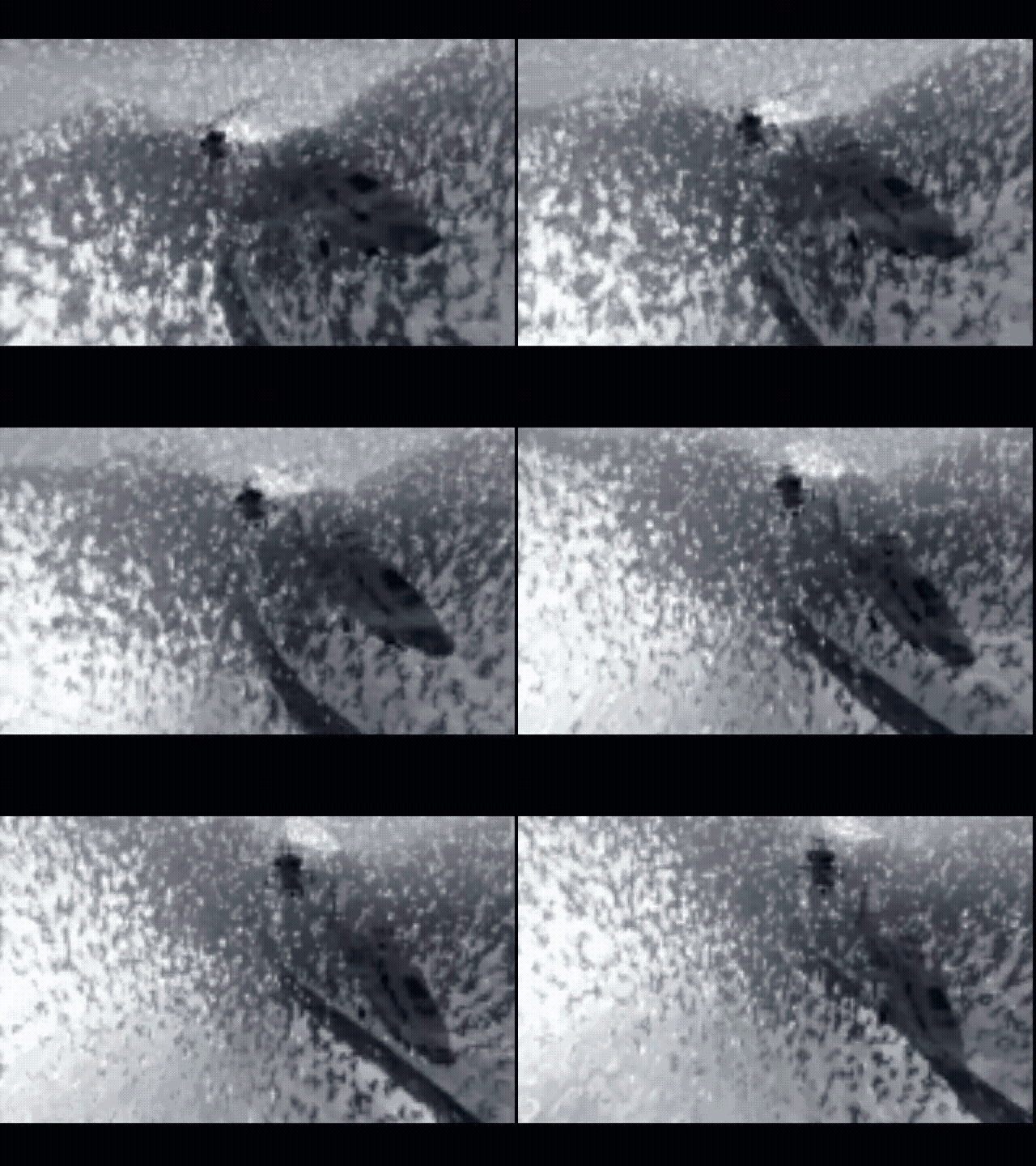
The grain-field sequence captures the noisy monochrome texture/particle style that recurs in the public video. It is useful because still frames make this look like a static texture, while the actual material is animated.
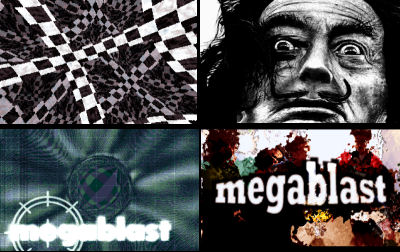
Pouet's public screenshot is a 400x252 montage of four states: a checker/warp, a face still, a blue title field, and the photo/title card.
Effect Pass
The first article pass under-described the actual effects. The video makes
Megablast look less like a sequence of unrelated pictures and more like a
resource-driven compositor: almost every part combines a source image or texture
with an animated distortion mask, an additive highlight layer, or a geometric
overlay.
The public reference breaks into these visible families:
0:00-0:25  monochrome mountain/snow image sequence, heavy grain/noise mask
0:25-0:55  blue-green circuit/brain collage, boxed picture overlays, logo scan
0:55-1:20  white streak / lens-burst line field
1:20-1:40  red circuit-board scene with additive orange object
1:40-1:55  high-contrast marble or fluid warp
1:55-2:10  green wireframe cells over numeric/terminal background
2:10-2:45  schematic background, Orange-style star logo, soft white blob field
2:45-3:20  blue title field into translucent edge-lit blob deformation
3:20-3:45  black/white checker tunnel and photo-face distortion
3:45-end   photo/title card and final blue organic blob shapes
Grain-Masked Photo Motion
The opening is not just a still photo. The mountain/snow frames are filtered through a moving high-frequency mask, so contrast appears to crawl over the image while the underlying picture remains readable. Technically this can be done with a texture/noise page used as a threshold, alpha-like matte, or palette remap source. The important visual detail is that the motion is in the mask and the tonal remapping, not in a camera move.
That same idea returns later in the face/photo material: the source image is
recognizable, but black/white thresholding, grain, and contrast inversion do the
work. This connects directly to the archive shape: DATA.DAT contains direct
RIX images, and the executable has enough protected-mode resource plumbing to
stream or copy image pages instead of synthesizing every screen from code.
Circuit-Collage Compositor
The blue-green middle section layers several things at once: a circuit-board background, soft warped organic texture, thin rectangular frames, small inset images, and white logo/text overlays. The animation reads like a 2D compositor because the planes move or fade independently. It is not a traditional single fullscreen plasma or rotozoomer; the effect is the accumulation of separately weighted layers.
The boxed overlays are especially telling. They use hard rectangular masks over
a distorted background, which suggests blit windows or composited framebuffers
rather than one global texture mapper. This is also why the part fits the large
DATA.DAT model: the demo can afford multiple visual sources and masks.
Burst And Streak Fields
The white burst part is a line/particle field rather than a textured picture. It repeatedly pushes bright streaks outward from a center or tight horizontal band, with additive-looking accumulation where lines cross. In code terms this is likely a table-driven point/line renderer with decay or overdraw on a dark buffer. Visually it works as a reset between the busier picture-composite sections.
Red Board / Additive Object
The red scene uses a dim circuit schematic as a static or slowly moving plate and then draws a glowing orange object over it. The object does not look like a flat sprite: it smears and blooms, with brighter ridges inside a softer transparent body. That points to a small transformed mesh, contour field, or height/texture object rendered into a buffer and then palette-added over the background.
The key difference from the blue title blob is color and context, not just a new image. The red part keeps a strong technical-board plate behind the object, while the later blue part isolates the object on black and lets its edge motion carry the screen.
Wireframe Cells
The green section is the most geometric part in the sampled timeline. It draws irregular cell outlines over a numeric/terminal-looking background. The lines have a clean vector quality and rotate or reproject, but the filled background stays mostly planar. That makes it read as a 2D/3D hybrid: vector points and edges on top of a prepared texture layer.
This is not the same vocabulary as the 1992-1994 filled-vector demos in the collection. By 1996 Orange is treating the geometry as a graphic design layer, not as the whole point of the screen.
Title Field And Edge-Lit Blob
The megablast title part combines a noisy blue-green background, warped
organic texture, white circular UI marks, and a bright logo layer. The logo
overexposes into the background, then the scene shifts into the translucent
blue blob.
The blob effect is the strongest technical screen in the current GIF set. It has three simultaneous cues:
- an irregular animated outline with a bright cyan rim,
- a darker semi-transparent interior with diagonal/soft texture,
- moving specular segments that travel along or across the edge.
That combination is harder than a simple tunnel or sprite. It likely uses a precomputed or generated deformation field plus palette/additive edge shading: one layer defines the body, another emphasizes the contour, and another drives the bright traveling highlights. The later blue organic shapes near the end of the video look like the same family with different masks or source textures.
Checker Tunnel And Face Distortion
The black/white checker sequence is the closest part to a classic texture mapper. It behaves like a tunnel or polar remap of a checker page: squares stretch radially and fold toward the center. Unlike many early tunnel effects, the palette is harsh monochrome, making aliasing and geometry part of the design rather than something to hide.
The face sequence that follows uses similar high-contrast treatment but with photo material. The image is not presented as a clean portrait; it is pushed through thresholding, warping, and sometimes a torn-edge mask. This is another place where the resource-heavy package matters: the effect is produced by processing recognizable image material, not by pure procedural drawing.
Effect Architecture Reading
From the binary and resources, the safest model is:
PMODE/W executable
  -> initializes MIDAS / sound device
  -> loads external S3M music
  -> reads DATA.DAT and PCX/RIX image resources
  -> sequences protected-mode VGA effects against music timing
  -> combines image pages, distortion tables, vector lines, and palette fades
The evidence does not prove the exact inner loops yet, but it narrows the
effect design. Megablast is not primarily a polygon demo. It is a late-DOS
image-processing demo: photos, circuit plates, texture pages, masks, warps,
additive highlights, and short vector overlays are sequenced as graphic design
scenes. That is why the decoded RIX and PCX resources are not just archive
trivia; they are the raw material for the look.
Archive Evidence
The examined archive is the public Scene.org package:
30aab57fe6b98e2b845512bd87d6152a01281581e824ae4942b74b176cd0172a megademo.zip
Extracted files:
00f6fb97787666515080773579b95a277796d432103301aebe80e93f13277dc2  DATA.DAT
a911f7975e5baf84201d5c0f7e82c1f4a3bacc34b5d73919c95d0147ff225062  DEMO.EXE
b801d34de26d6e42277474cb8785bf5f290d7ae9f1b1d689c509dd68d24c491a  FILE_ID.DIZ
0af6714ed5dc8822555906e8a21ba321417b0f7efe57865684c282a874918f3e  INFO
8c87f11549f59704fef65a34b508a51a7a1161ebbffef1456f393583cc3071f9  MUSTAKS.S3M
f81db94081f46d540c028d5ff83d0c67ca240b890f7861907f6823e81bb39ec8  PLASTI3D.PCX
File roles:
DEMO.EXE       282,715 bytes  PMODE/W LE executable
DATA.DAT     4,010,595 bytes  resource file starting with RIX3
MUSTAKS.S3M    816,204 bytes  Scream Tracker 3 module, title "blak scpek"
PLASTI3D.PCX   242,678 bytes  512x512 8-bit PCX texture/still
INFO                89 bytes  short memory / MIDAS note
FILE_ID.DIZ         35 bytes  release identifier
INFO says the demo supports many sound cards through MIDAS and may need more
than 8 MB of memory. That fits the executable strings and the large external
module/resource shape.
Direct Archive Images
DATA.DAT contains three directly decodable RIX3 resources found in the first
pass:
0x000000  RIX3  256x256
0x2fb41b  RIX3  256x256
0x362c6c  RIX3  320x200
Each is the simple RIX layout used elsewhere in the collection: 10-byte header, 768-byte VGA palette, then indexed pixels. The contact sheet below is made from those direct resources.

The first image is a green/blue blurred field or texture source:

The second is a checker/object texture source:

The third is a 320x200 photo/title card matching the lower-right region of the Pouet screenshot:

The standalone PCX is a 512x512 8-bit greyscale-looking texture. It is likely an input for the warped marble/noise parts rather than a final full-screen card:

Executable Layout
DEMO.EXE is a PMODE/W v1.20 executable:
PMODE/W v1.20 DOS extender - Copyright 1995, Daredevil and Tran.
LE header offset:  0x2620
object count:      2
page size:         0x1000
The LE object table begins at 0x26e4 and gives two main protected-mode
objects:
object 1 virtual size:  0x1a37d
object 1 base:          0x10000
object 1 pages:         27

object 2 virtual size:  0x2a7f0
object 2 base:          0x30000
object 2 pages:         29
The file also contains visible resource and subsystem markers:
PMODE/W
SCRM
ULTRASND
BLASTER
Soundcard memory heap corrupted
Sound Device channels not open
Sound Device hardware failure
MIDAS Error:
FATAL MIDAS uninitialization failure:
No Sound Sound Device v2.00
Gravis Ultrasound Sound Device v4.00
Sound Blaster series Sound Device v2.20
Those strings make the runtime model concrete. The executable is not a minimal
effect-only shell; it embeds the MIDAS sound-device layer and chooses among
no-sound, GUS, PAS, Windows Sound System, and Sound Blaster paths before or
during playback. The shipped MUSTAKS.S3M is the music payload for that layer.
Function-Level Disassembly Pass
The first Megablast pass stopped too early: it identified the PMODE/W and
resource shape, but did not map enough functions. This pass extracts the LE
objects from DEMO.EXE and treats object 1 as the main code object:
object 1 base:   0x10000
object 1 raw:    0x1b000 bytes
object 1 hash:   69f55d8180778208097efb69a6dd55f2bb4a99e7f7d29afd845dea3cbfa2cc30

object 2 base:   0x30000
object 2 raw:    0x1c65b bytes
object 2 hash:   b88f15d04609ea74747c11d558783126198fbc0c2612f9658d17771077056834
The LE header names object 1 as the entry object with EIP = 0xbf20, which
lands in the WATCOM/PMODE startup area. The demo-specific dispatcher is earlier
in object 1, especially around 0x101f0. Object 2 is data-heavy: it contains
the visible MIDAS strings, file names, error table, sound-device descriptions,
and large generated/lookup tables.
Shared Timer And Music Stage State
The smallest verified timing callback is at 0x10010:
0x10010: inc dword [0x1c688]
0x10016: ret
That dword is sampled throughout the dispatcher as the local tick counter.
The routine at 0x10068 bridges from the music/player state into the visual
state:
0x10068: push 0x1c660
0x1006d: push dword [0x200e0]
0x10074: call 0x18394
...
0x10089: mov  eax, [0x1c660]
0x1008e: mov  edx, [eax]
0x10090: mov  [0x14911], edx
0x10096: mov  eax, [eax+8]
0x10099: mov  [0x14915], eax
The exact MIDAS structure layout is not named in the binary, but the use is
clear: 0x14911 is the main stage/order value tested by the visual dispatcher,
while 0x14915 is a secondary music-position value used by some phase-update
routines. This is why the top-level loops compare against values such as
0x03, 0x09, 0x14, 0x24, and 0x34 instead of only counting video
frames.
Top-Level Visual Dispatcher
The visual driver around 0x101f0 initializes MIDAS/playback, sets BIOS mode
13h, loads external resources, then runs a long sequence of music-gated
effect loops. The repeated pattern is:
setup part
while [0x14911] < target_stage:
    0x10068          refresh music stage/order state
    per-frame part   draw/update one frame
    [0x1c670]++      local frame counter for the part
teardown/transition
The recovered dispatcher calls give the first concrete map of the show:
0x101f0  main visual dispatcher / mode-13h setup
0x10068  music-stage sync helper

stage < 0x03  0x14601 frame, 0x1452b/0x14648 transition
stage < 0x09  0x110b6 setup, 0x1200a/0x1211e frames, 0x11970/0x11578 transitions
stage < 0x0b  0x14bd7 setup, 0x14e7a frame, 0x14c13 transition
stage < 0x0e  0x14e79/0x152bc setup, 0x1563a frame, 0x1531b transition
stage < 0x14  0x159de setup, 0x15e3b phase update, 0x15a40 frame, 0x15e2f transition
stage < 0x18  0x11366 setup, 0x12198 frame, 0x11cde transition
stage < 0x1c  0x12a9e setup, 0x141ba frame, 0x12afc transition
stage < 0x20  0x11223 setup, 0x12198 frame, 0x11774 transition/frame composite
stage < 0x24  0x1627b setup, 0x1663d phase update, 0x1637d frame
stage < 0x26  0x147a1 setup, 0x148c1 frame, 0x14859/0x149bd transition
stage < 0x2a  0x142de setup, 0x145c4 frame, 0x143ea/0x1463c transition
stage < 0x2e  0x16802 setup, 0x16d1c phase update, 0x169ea frame
stage < 0x30  0x1627b setup, 0x166e9 phase update, 0x1637d frame
stage < 0x34  0x162d7 setup, 0x1663d phase update, 0x1637d frame, exit cleanup
This explains the public video's many short visual families. They are not separate executables or random stills; they are parts inside one music-position-driven dispatcher.
PCX/RLE Resource Decoder
The small decoder at 0x10968 is a PCX-style RLE line expander. It skips a
128-byte header, checks the high two bits for 0xc0 packets, writes either a
literal byte or a repeated byte, and stops when the requested output width in
EBP has been produced:
0x10968: add esi, 0x80       ; skip PCX header
0x10973: lodsb
0x10976: and ah, 0xc0
0x10979: cmp ah, 0xc0
0x1097e: and al, 0x3f       ; repeat count
0x10985: lodsb              ; repeated value
0x10986: rep stosb
...
0x10990: add esi, 0x301     ; skip palette/trailer area
This directly supports the decoded-resource evidence. The standalone
PLASTI3D.PCX and PCX-like image payloads are not just external stills; the
runtime has a compact path for expanding indexed image sources into chunky
work buffers.
Mode, Palette, And Frame Copy Paths
Several setup functions begin by setting BIOS mode 13h, allocating or
aligning 0xfa00-byte pages, and writing a 768-byte VGA palette through
3c8h/3c9h. The setup at 0x110b6 is representative:
0x110b6: mov ax, 0x13
0x110ba: int 0x10
...
0x110eb: add eax, 0xfa00
0x110f6: mov [0x0e06], eax
...
0x1115c: mov dx, 0x3c8
0x11165: rep outs dx, byte [esi]   ; 0x300 DAC bytes
The frame/composite code around 0x11774 and 0x11970 shows how the demo
turns tables and expanded resources into visible 320x200 output. It iterates
50 by 80 coarse cells, samples a source map using fixed-point deltas, writes
four chunky pixels at a time, scales a palette by a fade factor, waits on the
VGA retrace bit at 3dah, and finally writes the frame to A0000h:
cell grid:       0x32 rows by 0x50 columns
frame size:      0xfa00 bytes
palette size:    0x300 bytes
retrace wait:    port 0x3da bit 3
visible copy:    edi = 0x000a0000
The inner address generation uses the high bytes of fixed-point coordinates as lookup indices:
mov bh, ch
mov bl, dh
mov al, [ebx]
...
rol eax, 16
mov ah, [ebx]
mov [edi], eax
That matches the visual language of the public video: many parts are not pure polygon renderers, but table/image remappers with palette fades and overlays.
Representative Effect Mechanics
The family around 0x11970 builds a distorted grid/remap. It walks an 0x33 by
0x51 lattice, derives two phase indices from globals such as 0xe59a,
0xe5a2, 0xe5aa, and 0xe5b2, samples sine tables at 0xe5e and 0x1e62,
then stores projected fixed-point coordinates into the table at 0x647e. The
following pass uses those coordinates to resample a source image into the
offscreen page. This is the kind of routine that plausibly feeds the public
video's warped photo/checker/marble sections.
The family around 0x159de, 0x15a40, and 0x15e3b is more procedural. It
allocates two 64K-ish pages, expands a PCX-like source, writes a palette table
at 0x129b0, then builds a noisy/light field. The frame routine increments a
random-looking seed with +0x9d, rotates it, masks it down to 0x7ff, and
adds small brightness values into a 0x500-limited region before converting
nibble-like values through a table at 0x13279. The phase update at 0x15e3b
advances eight sine phase variables by different signed deltas:
0x13259 +=  3
0x1325d += -5
0x13261 +=  8
0x13265 +=  4
0x13269 += -7
0x1326d += -3
0x13271 +=  5
0x13275 +=  4
all masked with 0x0fff
That is strong evidence for the moving grain/blob/highlight behavior rather than a static picture with a simple fade.
The later table builder around 0x1637d creates two 128-byte waveform rows at
0x14988 and 0x14a08, sums four sine channels for each row, adds 0x1000,
shifts by six, then combines the two 128-byte rows into a 128x128 byte field at
0x14b10. The visible frame path waits for retrace and calls a final copy
helper after optional palette pokes:
0x14988  first 128-byte sine-combined row
0x14a08  second 128-byte sine-combined row
0x14b10  128x128 combined byte field
0x1663d  phase update for this family
This maps well to the blue organic/edge-lit blob sections: the object is driven by multiple wrapped sine phases and byte-field composition, with the contour and highlights coming from table/palette treatment rather than a hand-drawn sprite.
The FPU-heavy routine at 0x16d80 is a true floating-point geometry builder.
It iterates about 26 by 41 samples, computes transformed coordinates with FPU
operations, stores results into tables around 0x1c69c, 0x1c6a0, and
0x1e7ec, and calls 0x1c20d inside the projection/math path. That gives the
green wire-cell / schematic-line material a better code anchor than the first
pass had: at least one later part is not just image processing; it uses a
floating-point surface/geometry generator.
What This Changes
The safer technical reading is now:
resource-heavy PMODE/W demo
  -> WATCOM/PMODE startup
  -> MIDAS/S3M playback and music-position query
  -> one dispatcher at 0x101f0 gated by music stage [0x14911]
  -> PCX/RIX/image expansion paths
  -> repeated mode-13h + 0xfa00 offscreen pages
  -> image/table remappers, byte-field generators, sine phase fields,
     palette fades, and some FPU geometry builders
The public-video effect pass remains useful, but it should be read through
this code structure. Megablast is not just a set of pictures with overlays;
it is a music-synchronized sequence of table-driven remappers and generated
byte fields, with enough resource input to make those routines look much more
designed and photographic than a compact 64K intro.
Runtime-To-Code Concordance
The public-video timeline and the recovered dispatcher cannot yet be matched frame-perfectly, because the local DOSBox-X capture still fails at the graphics mode switch and the music-order structure is only partially named. Still, the combination of visible parts and recovered stage gates is strong enough for a bounded concordance.
visible public-video family                  strongest recovered anchor
-------------------------------------------  --------------------------------
monochrome grain/photo opening               stage < 0x03 / early frame path
blue-green collage and boxed overlays         0x110b6 setup + 0x11970 remap family
white burst/streak reset                      short table/line frame families
red board with additive object                image plate + generated field family
marble/checker/photo warps                    PCX/RIX expansion + grid remap path
green wire/cell schematic                     FPU geometry builder near 0x16d80
title/blue organic membrane                   128x128 sine byte-field family
late face/card/blob material                  later 0x1627b/0x1637d field passes
This is deliberately not a claim that every timestamp has a named function.
The proven part is the architecture: 0x101f0 gates sections by music stage,
several stages reuse the same mode-13h/offscreen-page/palette-copy machinery,
and different scene families swap in different generators: PCX-style RLE
decode, grid remapping, sine-combined byte fields, and at least one
floating-point geometry builder.
The useful practical reading is therefore:
- The grain/photo and face material are resource images plus threshold/noise or remap treatment, not pure procedural art.
- The checker/marble/organic sections match source-image remapping and byte-field generation better than sprite playback.
- The green cell scene is the strongest geometry candidate because the FPU builder produces coordinate tables instead of just sampling pictures.
- The blue membrane is best explained by the 128x128 sine-combined byte field, palette/edge treatment, and final copy path, not by a hand-drawn sprite.
- The visible hard cuts and short families are expected: the code is one music-stage dispatcher with many bounded loops rather than one continuous evolving renderer.
This is also why the public-video GIFs are more useful than isolated stills. The code evidence says many parts are table or phase driven; the GIFs show the phase motion, edge travel, and remap drift that still frames hide.
Resource Model
The archive resource layout explains why Megablast looks broader than a 64K
single-effect intro:
- Large
DATA.DATallows direct stills, texture pages, tables, or packed effect material outside the executable. PLASTI3D.PCXgives a high-resolution texture source that can feed the marble/noise/warp family of scenes.MUSTAKS.S3Mmoves the music outside the executable, unlike a tightly packed 64K.- The PMODE/W + MIDAS executable glues resource streaming, audio setup, and effect sequencing together.
The public video confirms that the resource-heavy structure is visible: the demo moves between photo cards, texture warps, schematic overlays, logo compositing, and luminous object deformation. The decoded RIX files are therefore not incidental; they match recognizable screen states in the public reference.
Capture Boundary
Local DOSBox-X test configuration:
DOSBox-X 2026.01.02
machine: svga_s3
memsize: 32 MB
cycles:  fixed 60000
sound:   disabled for first pass
capture: DOSBox-X internal dx-capture
Result:
demo_000.avi  720x400  0.927 s  text prompt / startup fragment
demo_001.avi  640x400  0 frames graphics fragment
The recorder stopped and reopened at the graphics switch, then DOSBox-X aborted with:
double free or corruption (!prev)
Those local files are not used as visual evidence. The GIFs in this article come from the public video linked on Pouet, and the stills come directly from the public screenshot or from archive resource decoding. A future local pass should use a recorder path that survives the graphics switch and then replace or augment the public-video GIFs with direct local DOSBox/video slices.
Why It Matters
Megablast is a useful Orange target because it sits between two familiar
forms: the resource-heavy 1996 PC demo and the compact Orange 64K. Compared
with Deesbab, it is much less size-constrained and shows that Orange's 1996
visual style was not just one technical trick. Compared with Super Television, it is more compactly packaged but still uses the same late-DOS
protected-mode, external-module, VGA-resource vocabulary.
The important technical takeaway is that the visible style is resource and post-processing heavy: RIX stills, a large PCX texture, MIDAS/S3M audio, and a PMODE/W sequencer driving warped, noisy, overlaid scenes. That matches the public-video motion better than a static screenshot does.